- Posts: 103
- Thank you received: 10
- Forum
- Open Forum
- Miscellaneous Research Topics
- Flight Sim Scenery Design and Scale Modelling
- Blending into FSX
Blending into FSX
- Ian P
- Topic Author
- Offline
- Senior Member
-

Less
More
17 Jan 2015 15:36 #1
by Ian P
Blending into FSX was created by Ian P
Hi folks.
I don't know if anyone frequents this bit of the forum any more, but I've been learning Blender as a replacement for gmax to create models for use in MS FSX and, it has to be said, I'm finding the newer software a lot easier to use!
The following are some of the models that I have produced so far. If there's any interest, as I do more, then I'll add to the thread.
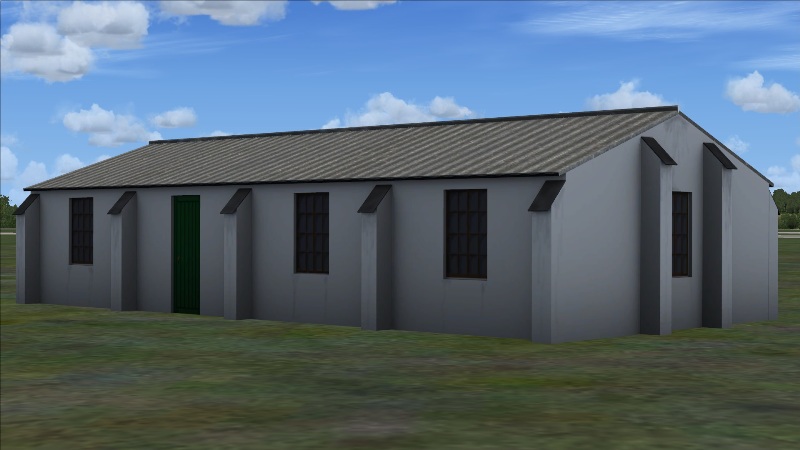
Halfpenny Green's Watch Office and Chief Instructors Office 641/41 (I'm aware that the bay roofing is incorrect. sorry! I may revisit this, it was based on photos of a different building, before I found Paul's photo of HG's)
This image is hidden for guests.
This image is hidden for guests.
Halfpenny Green's Post Office (has since had the doors and windows textured properly!)
This image is hidden for guests.
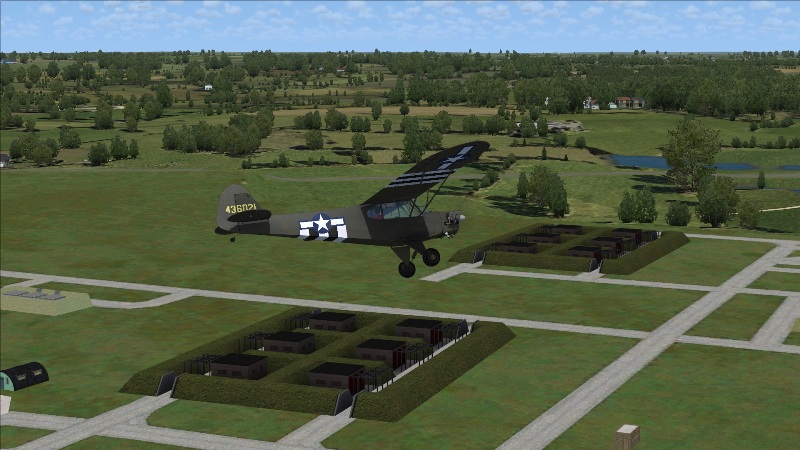
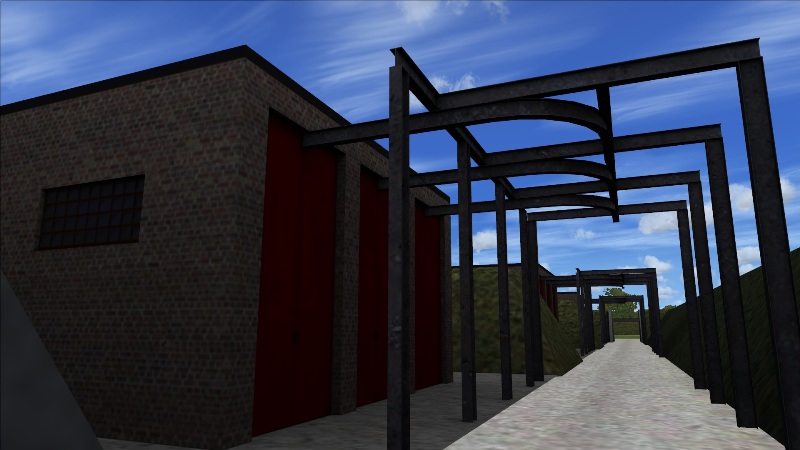
Incendiary Store 3054/36 (based on Jurby, numerous overhead images - intended for use on WiP RAF Watton scenery)
This image is hidden for guests.
This image is hidden for guests.
Cheers,
Ian P.
I don't know if anyone frequents this bit of the forum any more, but I've been learning Blender as a replacement for gmax to create models for use in MS FSX and, it has to be said, I'm finding the newer software a lot easier to use!
The following are some of the models that I have produced so far. If there's any interest, as I do more, then I'll add to the thread.
Halfpenny Green's Watch Office and Chief Instructors Office 641/41 (I'm aware that the bay roofing is incorrect. sorry! I may revisit this, it was based on photos of a different building, before I found Paul's photo of HG's)
This image is hidden for guests.
Please log in or register to see it.
This image is hidden for guests.
Please log in or register to see it.
Halfpenny Green's Post Office (has since had the doors and windows textured properly!)
This image is hidden for guests.
Please log in or register to see it.
Incendiary Store 3054/36 (based on Jurby, numerous overhead images - intended for use on WiP RAF Watton scenery)
This image is hidden for guests.
Please log in or register to see it.
This image is hidden for guests.
Please log in or register to see it.
Cheers,
Ian P.
Please Log in or Create an account to join the conversation.
- Stevo
- Offline
- Premium Member
-

Less
More
- Posts: 441
- Thank you received: 2
19 Jan 2015 00:47 #2
by Stevo
Replied by Stevo on topic Blending into FSX
Hi,
i have briefly used blender and it is one nice bit of kit, I did find the initial learning curve quite different to When I learnt Gmax but it didn't take too long to learn the basics. I haven't used it in a few months as I've used 3dsmax for my modelling for quite a few years.
Only thing to remember especially in FSX is to make sure you keep drawcalls, polygon and texture vertices count to a minimum and add LOD models otherwise the FPS will grind to a slide show, especially with a lot of highly detailed models.
Stevo
www.airfieldconstructiongroup.org
i have briefly used blender and it is one nice bit of kit, I did find the initial learning curve quite different to When I learnt Gmax but it didn't take too long to learn the basics. I haven't used it in a few months as I've used 3dsmax for my modelling for quite a few years.
Only thing to remember especially in FSX is to make sure you keep drawcalls, polygon and texture vertices count to a minimum and add LOD models otherwise the FPS will grind to a slide show, especially with a lot of highly detailed models.
Stevo
www.airfieldconstructiongroup.org
Please Log in or Create an account to join the conversation.
- Ian P
- Topic Author
- Offline
- Senior Member
-
Less
More
- Posts: 103
- Thank you received: 10
28 Jan 2015 14:54 #3
by Ian P
Replied by Ian P on topic Blending into FSX
Hi Stevo,
Yes. Thanks for the advice. I've actually used gmax to create FSX models for a while, but the inability to zoom in and the awful live preview render made it really difficult to work out what was going on. That and the fact that it is very difficult to add new elements to a mesh in gmax, whereas Blender is subdivision based and you have a lot more control, is what drove me over to the newer package.
I'm certainly finding it a lot faster to design in Blender and UV Mapping is a lot easier. My experience with gmax hasn't been overly positive - I much preferred 3DS Max, but couldn't afford the £3.5k price tag, plus it goes lease only later this year.
I don't think I'll be challenging your scenery design for a long while yet, but I'm finally able to create things that I feel happy with.
One question you may be able to help with; is there a quick way of calculating draw calls for FSX, do you know? I'm not sure how it works with bump maps and spec maps, etc. I presume each map adds an additional multiple of draw calls, depending on what is calling it? Low vertex count hopefully isn't a massive issue with what I'm creating - the main stores is 1714 and the incendiary store is 5228, which considering all the metalwork and the fact that there will only be one or two incendiary stores visible, I'm not overly worried by at present. If anyone does see a slow down when I let the public loose with it, then I'll take out the metal gantrywork as a LOD, but I know people who will use 5000 vertices to make the components on the roof of a building, which most people then never see!
Right now, by far the biggest hit at Halfpenny Green is from the AI. Unfortunately John hasn't done an AI Anson (yet?), so I'm having to use the Aircraft Factory or FS Addon player models.
Cheers,
Ian P.
Yes. Thanks for the advice. I've actually used gmax to create FSX models for a while, but the inability to zoom in and the awful live preview render made it really difficult to work out what was going on. That and the fact that it is very difficult to add new elements to a mesh in gmax, whereas Blender is subdivision based and you have a lot more control, is what drove me over to the newer package.
I'm certainly finding it a lot faster to design in Blender and UV Mapping is a lot easier. My experience with gmax hasn't been overly positive - I much preferred 3DS Max, but couldn't afford the £3.5k price tag, plus it goes lease only later this year.
I don't think I'll be challenging your scenery design for a long while yet, but I'm finally able to create things that I feel happy with.
One question you may be able to help with; is there a quick way of calculating draw calls for FSX, do you know? I'm not sure how it works with bump maps and spec maps, etc. I presume each map adds an additional multiple of draw calls, depending on what is calling it? Low vertex count hopefully isn't a massive issue with what I'm creating - the main stores is 1714 and the incendiary store is 5228, which considering all the metalwork and the fact that there will only be one or two incendiary stores visible, I'm not overly worried by at present. If anyone does see a slow down when I let the public loose with it, then I'll take out the metal gantrywork as a LOD, but I know people who will use 5000 vertices to make the components on the roof of a building, which most people then never see!
Right now, by far the biggest hit at Halfpenny Green is from the AI. Unfortunately John hasn't done an AI Anson (yet?), so I'm having to use the Aircraft Factory or FS Addon player models.
Cheers,
Ian P.
Please Log in or Create an account to join the conversation.
- Stevo
- Offline
- Premium Member
-
Less
More
- Posts: 441
- Thank you received: 2
28 Jan 2015 18:34 #4
by Stevo
Replied by Stevo on topic Blending into FSX
Hi Ian,
There isn't really a way to find out the drawcall use within the sim but you can keep track of it by being aware of what you add to each model.
At a very basic level think of it like this, each material applied to a model can be classed as a drawcall, one building + one material = 1 drawcall
so
if you have 70 buildings with one material each you'll have 70 drawcalls.
you can reduce this by creating a scene of buildings that are close together and put all the textures for the scene on one texture sheet such as a 1024x1024, 2048,2048 or for high def texture 4096x4096. Personally I put the textures for around six or seven buildings onto a single 4096 x 4096, I can then either use the full res texture or reduce it to 2048x2048 or 1024x1024 as required to save memory space.
So now where those 6 or 7 single models would use 6 or 7 drawcalls, the scene of 6 or 7 buildings now uses only 1 drawcall.
even putting two building per texture you would half the amount of drawcalls.
thats is at a basic level, I think adding bump mapping and specular textures adds extra drawcalls for each material
AI can be a drawcall eaters if they aren't done with optimisation in mind....
hope that helps. any further help just pop over to our forum.
Stevo
There isn't really a way to find out the drawcall use within the sim but you can keep track of it by being aware of what you add to each model.
At a very basic level think of it like this, each material applied to a model can be classed as a drawcall, one building + one material = 1 drawcall
so
if you have 70 buildings with one material each you'll have 70 drawcalls.
you can reduce this by creating a scene of buildings that are close together and put all the textures for the scene on one texture sheet such as a 1024x1024, 2048,2048 or for high def texture 4096x4096. Personally I put the textures for around six or seven buildings onto a single 4096 x 4096, I can then either use the full res texture or reduce it to 2048x2048 or 1024x1024 as required to save memory space.
So now where those 6 or 7 single models would use 6 or 7 drawcalls, the scene of 6 or 7 buildings now uses only 1 drawcall.
even putting two building per texture you would half the amount of drawcalls.
thats is at a basic level, I think adding bump mapping and specular textures adds extra drawcalls for each material
AI can be a drawcall eaters if they aren't done with optimisation in mind....
hope that helps. any further help just pop over to our forum.
Stevo
Please Log in or Create an account to join the conversation.
- OneEighthBit
-

- Offline
- Elite Member
-

Less
More
- Posts: 795
- Thank you received: 13
29 Jan 2015 10:53 #5
by OneEighthBit
Replied by OneEighthBit on topic Blending into FSX
I was a FSX hacker back in the day. 
Always found this article interesting and useful with regards to performance.
blogs.technet.com/b/torgo3000/archive/20...performance-art.aspx
Always found this article interesting and useful with regards to performance.
blogs.technet.com/b/torgo3000/archive/20...performance-art.aspx
Please Log in or Create an account to join the conversation.
- Terry Boissel
-

- Offline
- New Member
-

Less
More
- Posts: 1
- Thank you received: 0
01 Oct 2017 19:31 #6
by Terry Boissel
Replied by Terry Boissel on topic Blending into FSX
I am using Sketchup Make 2017 and find it a real breeze to use, I don't seem to be able the get the hang of Blender. That said however, in Sketchup I can not get textures to show in FSX or P3Dv3. for instance if I just use solid colours there is no problem, but if I want to use a brick texture or a wood texture it shows up in the sim as black or any texture for that matter. I have converted the texture to DDS but I am struggling, has anyone had this issue and more importantly overcome it?
Please Log in or Create an account to join the conversation.
- Ian P
- Topic Author
- Offline
- Senior Member
-
Less
More
- Posts: 103
- Thank you received: 10
19 Oct 2017 19:42 - 20 Oct 2017 17:01 #7
by Ian P
Replied by Ian P on topic Blending into FSX
How are you converting from Sketchup to FSX/P3D, Terry? The biggest problem is probably because the Sketchup materials, rather than the textures, are not designed for FSX/P3D. As the material calls the texture, that will cause exactly the problem you're having.
Also, Sketchup's textures are not square. FSX/P3D textures have to be square and on the binary incremental sequence, so the usual texture sizes used are 512x512, 1024x1024, 2048x2048 and 4096x4096, usually, for scenery objects, with mip maps. You can't just assign, say, Sketchup's brick material to an object and have it appear in FSX. There's rather more to it than that, I'm afraid - if you're using an appropriate conversion, though, then it should fix all that stuff!
Edited to add: Welcome to the forum, by the way!
Cheers,
Ian P.
Also, Sketchup's textures are not square. FSX/P3D textures have to be square and on the binary incremental sequence, so the usual texture sizes used are 512x512, 1024x1024, 2048x2048 and 4096x4096, usually, for scenery objects, with mip maps. You can't just assign, say, Sketchup's brick material to an object and have it appear in FSX. There's rather more to it than that, I'm afraid - if you're using an appropriate conversion, though, then it should fix all that stuff!
Edited to add: Welcome to the forum, by the way!
Cheers,
Ian P.
Last edit: 20 Oct 2017 17:01 by Ian P.
Please Log in or Create an account to join the conversation.
- BertrandBarbe
- Offline
- New Member
-
Less
More
- Posts: 6
- Thank you received: 0
21 Oct 2018 15:32 #8
by BertrandBarbe
Replied by BertrandBarbe on topic Blending into FSX
hi! the export of sketchup into fsx is simple, in .dae so that it keeps the material mapping and the original material image, then import the dae into MCX, use the burn material into texture tool, then export the textures first then the object. Never had a problem, even with non square image, except that you won't have ambiant occlusion with sketchup, and you will have the textures one at a time. other than that, it's great for lumbering a lot of buildings in no time.
Please Log in or Create an account to join the conversation.
- Forum
- Open Forum
- Miscellaneous Research Topics
- Flight Sim Scenery Design and Scale Modelling
- Blending into FSX
Time to create page: 0.049 seconds